A few things can be managed globally. Here is a list of things you can do.
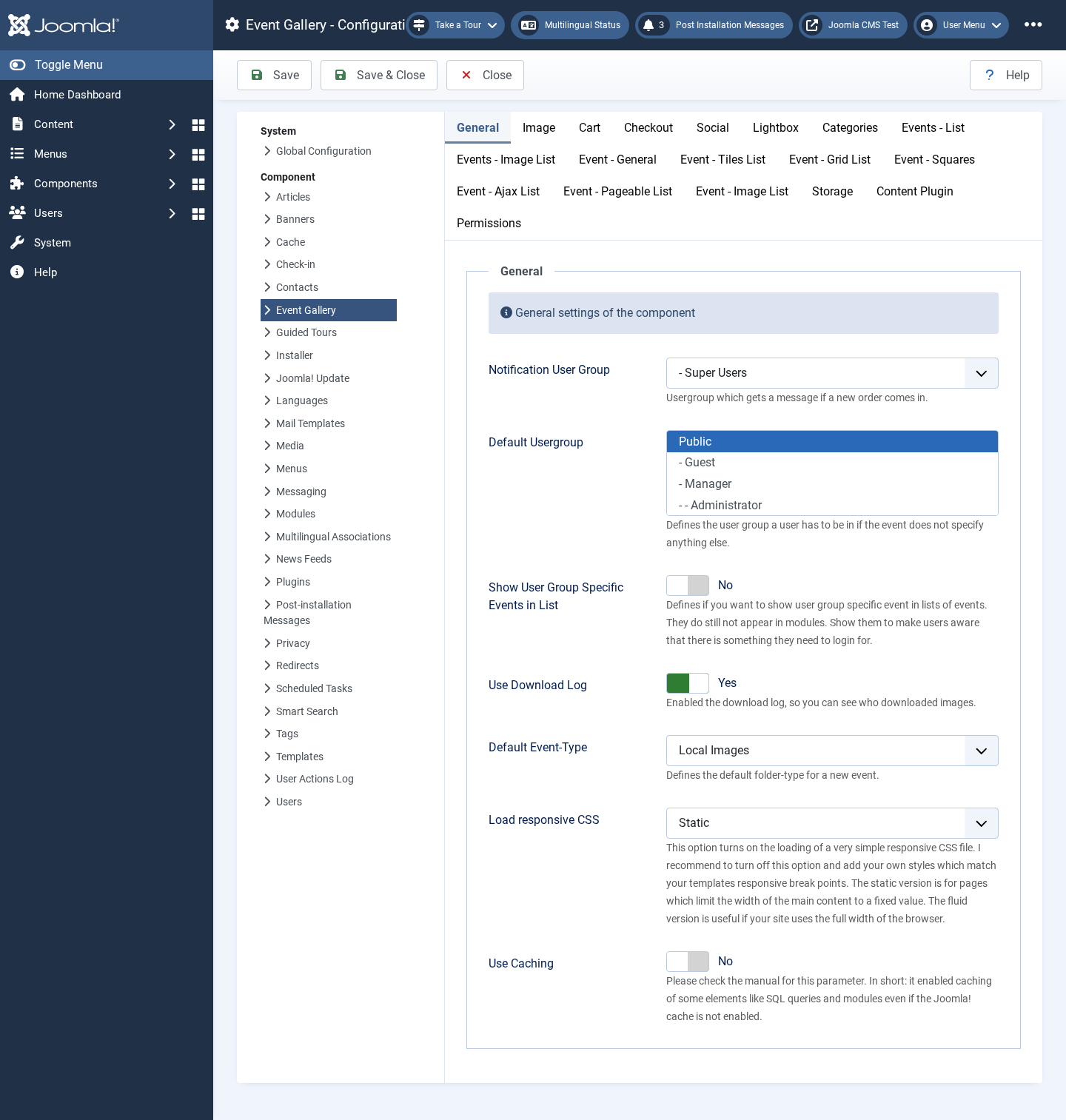
-
Notification User Group
Notifications about orders are sent to this user group. All users in this group which can receive system mails will get a mail upon an event.
-
Default Usergroup
You can force people to log in before they can see your images. This field provides a set of default user groups which are used if an event does not define its own.
-
Show User Group Specific Events in List
Defines whether you want to hide user-group-specific events in lists of events. They still do not appear in modules. Show them to make users aware that there is something they need to log in for.
-
Use Download Log
Enables a log of who downloaded which images.
-
Default Event-Type
Use this option to preselect the folder-type/Event-type when creating a new Event. This saves you from selecting the same event type over and over again.
-
Load responsive CSS
This option turns on the loading of an elementary responsive CSS file. I recommend turning off this option and adding your own styles which match your template’s responsive breakpoints. Please have a look at the FAQ section for example code.
Depending on the template you’re using, select the fluid or the static CSS. The static CSS is helpful if your template restricts the maximum width of the page. On the other hand, allows the fluid CSS to support the full browser width without having too large images.
-
Use Caching
If you enable this, some views of the component will use caching. This does not influence module caching. Modules have their own cache configuration. Please have a look at the caching section in this manual for details.